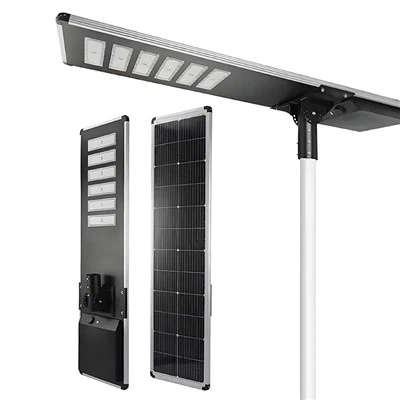
With the growing popularity of eco-friendly and energy-saving concepts, solar lights-thanks to their advantages of "zero electricity costs, easy installation, and zero pollution"-are now widely used in various settings, including courtyards, balconies, roadways, and outdoor campsites.
However, many first-time users often encounter issues such as insufficient charging, failure to light up, or short battery life due to improper operation. This prevents them from realizing the product's full potential and can even compromise the device's overall lifespan. Unlike conventional lighting fixtures, solar lights rely on photovoltaic conversion and battery storage; therefore, proper operation during the initial setup is crucial for ensuring stable, long-term performance. Drawing upon the specific characteristics of solar lighting products, this article provides a detailed, step-by-step breakdown of the entire first-time usage process-covering everything from preliminary preparations, operational steps, and key precautions to troubleshooting common issues. Balancing both technical accuracy and practical utility, this guide aims to help beginners quickly get up to speed, correctly initiate their solar lighting experience, and ensure that every solar light shines steadily with long-lasting endurance.
Understanding How Solar Lights Work
To use solar lights correctly, you must first grasp their core operating logic; this serves as the fundamental basis for avoiding operational errors during the initial setup.
1. Photovoltaic Conversion: The core component of a solar light is its solar panel. During the day, the panel absorbs sunlight and converts this light energy into electrical energy. This process requires no external power source and remains energy-efficient and eco-friendly throughout-marking the key distinction between solar lights and conventional lighting fixtures.
2. Energy Storage: The converted electrical energy is automatically stored in a built-in rechargeable battery. This battery serves as the power source that enables the solar light to illuminate at night; therefore, prior to first-time use, it is essential to ensure that the battery has received a full charge to guarantee proper illumination after dark.
3. Automatic Illumination: Solar lights feature a built-in light sensor. When ambient light levels dim (e.g., at dusk), the sensor automatically triggers the fixture to turn on; conversely, when ambient light levels brighten (e.g., at dawn), the light automatically switches off. This eliminates the need for manual switching, offering a convenient and hassle-free user experience. Some models also support manual on/off controls and mode adjustments, allowing users to operate the device according to their specific needs.
3 Essential Pre-Use Checks
Before using a solar light for the first time, performing a comprehensive inspection can effectively prevent operational failures caused by product defects or inadequate preparation. Focus on checking three core aspects-a simple and straightforward process that even beginners can easily complete:
1. Appearance and Accessories Check: Upon unboxing, first inspect the main body of the solar light, the solar panel, the mounting bracket, and the fastening accessories (such as screws and clips) to ensure they are all present, intact, and free from any damage, cracks, or loose parts. Additionally, check the integrity of the light fixture's housing seal to prevent water ingress during subsequent outdoor use, which could damage internal components.
2. Battery and Switch Check: Verify that the built-in battery is properly seated (note: some detachable batteries require manual installation). Ensure that the positive and negative terminals make good contact and are not loose or dislodged. Locate the power switch-typically situated near the solar panel or on the underside of the fixture-and confirm that it is in the "OFF" position. This prepares the unit for its initial charge and prevents unnecessary energy waste during the charging process.
3. Panel Cleanliness Check: The surface of the solar panel is typically covered by a protective film; this film must be completely removed before first use to prevent it from obstructing light and compromising photovoltaic conversion efficiency. At the same time, wipe the panel surface with a dry cloth to remove any dust or stains, ensuring the panel remains clean and clear to maximize sunlight absorption.
Step-by-Step Guide for First-Time Use: From Unboxing to Illumination
The key to using a solar light for the first time lies in three core actions: "Correct Installation," "Adequate Charging," and "Illumination Testing." By following these standardized steps-which require no specialized tools-even beginners can quickly get the unit up and running. A detailed, step-by-step breakdown is provided below:
Step one: Select a Suitable Installation Location: The chosen installation site directly impacts charging efficiency. Prioritize areas that are unobstructed and receive direct sunlight (such as open spaces in a courtyard, the exterior of a balcony, or a rooftop), ensuring that the solar panel can capture sunlight throughout the day without being shaded by trees or buildings. Additionally, avoid installing the fixture in locations where strong artificial light sources (such as streetlights) are present at night, as this may trigger a false reading from the light sensor, preventing the fixture from illuminating properly. For installations in the Northern Hemisphere, it is recommended to orient the solar panel directly toward the south; the tilt angle can be adjusted based on your local latitude to further optimize charging efficiency.
Step Two: Securely Mount the Fixture: Select an appropriate mounting method based on your specific usage scenario (e.g., bracket mounting, wall mounting, ground staking, etc.). Use the provided screws to firmly secure the mounting bracket, then attach the main body of the solar light to the bracket. Ensure the fixture is installed stably-free from wobbling-so it can withstand light wind and rain. It is recommended to adjust the installation height according to the type of fixture; for outdoor courtyard lights, a height of 1.4 to 1.8 meters is suggested to ensure adequate lighting coverage while preventing accidental bumps or damage.
Step Three: Initial Full Charge: Toggle the light's power switch to the "ON" position and place the solar panel in direct sunlight to initiate the initial charge. It is recommended that this first charge last for 8 to 12 hours to ensure the built-in battery reaches full capacity. Since the battery in a solar light may have been depleted during shipping or storage, a thorough initial charge serves to activate the battery, extend its overall lifespan, and prevent issues with insufficient runtime later on.
Step Four: Test the Lighting Effect: Once the initial charge is complete, wait until dusk when the ambient light dims, then observe whether the fixture lights up automatically. If you wish to test it immediately, you can cover the solar panel with your hand or an opaque object; if the light turns on normally, it indicates that both the installation and charging processes were successful, and the device is ready for its first use. If the fixture supports multiple brightness settings, you may refer to the user manual to switch between modes and test the different lighting effects.
Important Considerations for First-Time Use: Avoid Common Pitfalls and Protect Your Equipment
When using a solar light for the first time, many novices tend to fall into common operational errors. These mistakes not only compromise lighting performance but can also potentially damage the device. Pay close attention to the following four key points:
1. Do Not Use Immediately Without Charging: Never simply unbox the unit, flip the switch, and begin using it right away. An uncharged battery cannot provide sufficient power, which may prevent the light from turning on or even cause damage to the battery itself. You *must* complete the recommended 8-to-12-hour initial charge before using the device for the first time. (Note: For some specific models, it is recommended to keep the power switch in the "OFF" position during the initial charge and switch it "ON" only after the battery is fully charged; please refer to your product's user manual for specific instructions.)
2. Avoid Obstructing the Solar Panel During Charging: During the charging process, ensure that the solar panel remains completely free of any obstructions. Even a small amount of dust or fallen leaves can reduce the panel's photovoltaic conversion efficiency, thereby extending the time required to fully charge the battery. On rainy or overcast days, you may need to allow for a slightly longer charging period to ensure the battery reaches full capacity. During winter or in rainy and snowy weather, promptly clear any accumulated snow or water stains from the solar panel to prevent interference with the charging process.
3. Do not disassemble the fixture arbitrarily: When using the product for the first time, *never* attempt to disassemble the fixture casing, solar panel, or battery on your own. The interior contains precision electronic components; improper disassembly can lead to device malfunction and void the product warranty. If you discover any missing accessories or damage to the device, please contact the seller directly for assistance.
4. Select the appropriate lighting mode: Some solar lights offer multiple modes-such as high brightness, low brightness, and flashing-to suit various needs. For first-time use, it is recommended to select a mode that best fits your specific scenario. For outdoor courtyards, the high-brightness mode is suitable; for camping or decorative purposes, the low-brightness mode is recommended. This approach not only meets your lighting requirements but also conserves energy, thereby extending the duration of illumination at night.
Troubleshooting Common Issues During First-Time Use: Quickly Resolving Startup Problems
If you encounter issues during the initial use of your solar light-such as a failure to light up, slow charging, or a short illumination duration-there is no need to panic. These issues are often caused by improper operation. You can follow the troubleshooting steps below to quickly identify and resolve the problem with precision and efficiency:
1. The light fixture fails to turn on: First, check to ensure the power switch is in the "ON" position. Next, verify that the battery is installed correctly and that the positive and negative terminals are making proper contact. If these checks reveal no issues, the problem may be insufficient initial charging; allow the unit to continue charging for another 2–4 hours, then test it again. If the light still does not turn on, check to see if the solar panel is obstructed by any objects, or contact the seller to troubleshoot for potential device malfunctions.
2. Slow charging speed: In most cases, this is due to insufficient ambient light at the installation site, an obstruction blocking the panel, or an improper panel angle. Adjust the installation location to ensure the solar panel receives direct sunlight throughout the day. Additionally, wipe the panel clean to remove any dust or debris, and adjust the panel's orientation and tilt angle to maximize charging efficiency.
3. Short illumination duration: This is primarily caused by the battery not reaching a full charge during the initial charging cycle, or by insufficient ambient light preventing a complete charge. Perform a full recharge lasting 8–12 hours, ensuring the solar panel receives ample sunlight throughout the day. If this issue occurs during the winter months, it is considered normal behavior; you can switch to the low-brightness mode to extend the illumination time.
4. Automatic Lighting Malfunction: This issue is typically caused by the presence of other strong light sources near the installation site that obstruct the light sensor. Adjust the installation position to keep the unit away from interfering sources such as streetlights or indoor lighting. If the problem persists, check the sensor for dust accumulation; clean it thoroughly and then re-test the unit.
The key to successfully using a solar light for the first time lies in a simple, systematic approach: "Inspect first, then install, fully charge, and test the light." No complex procedures are required; even a novice can successfully activate the device simply by following the standard protocol. Begin by conducting a comprehensive pre-installation inspection of the unit's exterior, battery, and solar panel. Next, select an appropriate installation site that ensures the solar panel receives ample direct sunlight. Once securely mounted, allow the unit to undergo an initial full charge of 8–12 hours to properly activate the battery. Finally, test the lighting performance and troubleshoot any common issues to ensure the solar light operates correctly.
Furthermore, avoiding common pitfalls-such as using the unit immediately without charging, obstructing the solar panel, or attempting unauthorized disassembly-will not only ensure a smooth initial experience but also extend the device's overall lifespan and battery endurance. The convenience and energy efficiency of solar lights depend significantly on proper initial setup. By mastering the techniques outlined above, you can effortlessly embark on your solar lighting journey, fully leveraging its core benefits-being eco-friendly, hassle-free, and free of electricity costs-to meet the diverse lighting needs of various outdoor and residential settings. If you encounter any operational questions during the initial setup of your solar light-or if you experience issues such as the light failing to turn on or charging anomalies-or if you require assistance in selecting the most suitable solar lighting product for your specific application, please do not hesitate to contact us at any time!

Our address
No. 5-3 Niujiao Road, Yanchuan Community, Yanluo Subdistrict, Bao'an District, Shenzhen
benwei10@benweilighting.com