Choosing ceiling lights used to mean picking one color temperature and living with it. Today, a Tricolour LED Downlight can switch from a warm reading light to a blue party scene in seconds. This guide explains what RGBW means, how the system works, and where this type of downlight fits best.
What Does RGBW Mean?
RGBW stands for Red, Green, Blue and White. Standard RGB lights mix three colors to make white, which often looks slightly tinted. An RGBW downlight adds a dedicated white LED chip, so you get vivid colors and clean, natural white light in one fixture.
| Feature | RGB Downlight | RGBW Downlight |
|---|---|---|
| LED chips | Red, Green, Blue | Red, Green, Blue + White |
| White light quality | Mixed white, often bluish or tinted | Pure white from a dedicated chip |
| Color range | Millions of colors | Millions of colors + true white |
| Brightness in white mode | Lower | Higher |
| Best for | Decoration only | Decoration and everyday lighting |
What Is Included in the Package?
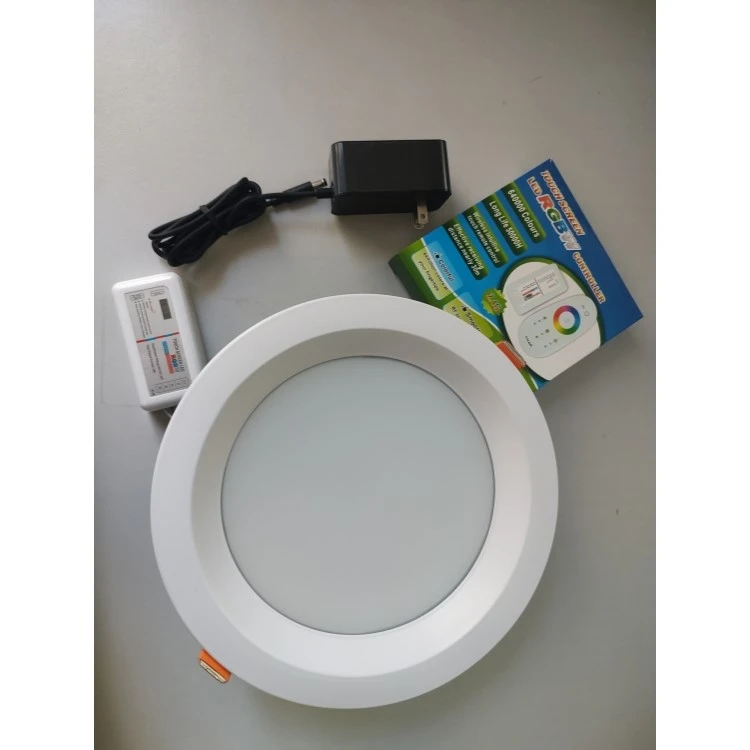
As shown in the photo above, the set is a complete smart lighting kit:
30W round recessed LED downlight with a white frame and frosted diffuser for soft, even light
External LED driver (power adapter) with a plug and DC connector
WiFi RGBW controller that connects the light to your phone and smart home
Remote control for use without a network
Key Specifications at a Glance
| Parameter | Reference Value |
|---|---|
| Power | 30W |
| Light colors | RGB + White (RGBW) |
| Color temperature (white) | 2700K–6500K (depending on model) |
| Luminous flux (white mode) | approx. 2400–3000 lm |
| Input voltage | AC 100–240V, 50/60Hz |
| Control | WiFi app, remote control, voice assistants |
| Dimming | 1%–100% via app or remote |
| Installation | Recessed, ceiling mounted |
| Ingress protection | IP20 (indoor, dry areas) |
| Lifespan | up to 25,000–50,000 hours |
| Beam angle | approx. 120° |
Note: Values are typical references. Please check the label and datasheet of your exact model.
How Does the WiFi Smart Control Work?
The downlight connects to a controller that talks to your home WiFi, so you can manage it in three ways:
| Control Method | What You Can Do | Needs WiFi? |
|---|---|---|
| Smartphone app | Change colors, dim, set timers and scenes, group lights | Yes (2.4GHz) |
| Remote control | On/off, brightness, color selection, preset modes | No |
| Voice assistant (Alexa / Google Assistant) | Hands-free commands such as "turn the light blue" | Yes |
Quick setup in 4 steps:
Install the controller's companion app on your phone.
Power on the light and put the controller in pairing mode.
Connect to your 2.4GHz WiFi network (5GHz is generally not supported).
Name the light, assign it to a room and start customizing.
How Does Dimming Work?
This downlight is dimmed through the app or remote, not through a standard wall dimmer switch. Using a conventional wall dimmer can cause flickering or damage the driver. For the best results, keep the wall switch on and control the light digitally.
Where Can You Use a 30W RGBW Downlight?
At 30W, this light is bright enough for rooms that need both functional and mood lighting.
| Space | Recommended Use | Suggested Setting |
|---|---|---|
| Living room | Movie nights, entertaining | Warm white for relaxing, blue or purple for movies |
| Bedroom | Winding down | Low-brightness warm white or soft amber |
| Home bar / KTV | Party atmosphere | Dynamic color modes |
| Restaurant / café | Ambience by time of day | Warm white at dinner, colored accents at events |
| Hotel / lounge | Brand-colored lighting | Preset scenes, group control |
| Retail store | Product highlights | Cool white for display, color for promotions |
| Kids' room | Play and night light | Colorful modes, low-brightness night mode |
What Are the Benefits Compared with Traditional Downlights?
| Benefit | Traditional Downlight | 30W RGBW WiFi Downlight |
|---|---|---|
| Color options | One fixed color temperature | Millions of colors + adjustable white |
| Control | Wall switch only | App, remote, voice |
| Scenes and timers | No | Yes |
| Energy use | Higher (halogen/CFL) | Low, LED efficiency |
| Atmosphere | Fixed | Changes with mood or occasion |
| Smart home ready | No |
Yes |
Installation Tips
Turn off the power at the breaker before starting.
Cut the ceiling hole to the size listed on the product page (check the cutout size of your model).
Connect the driver and controller according to the wiring diagram, keeping the controller within WiFi range.
Fix the downlight by pressing the spring clips and pushing it into the ceiling.
Pair the light with the app and test the remote.
For bathrooms or humid areas, choose a higher IP-rated version, because the standard model is for dry indoor use.
Troubleshooting Common Issues
| Problem | Possible Cause | Solution |
|---|---|---|
| Cannot connect to WiFi | Using a 5GHz network | Switch the phone to 2.4GHz during pairing |
| Light does not respond to the app | Weak signal | Move the router closer or restart the controller |
| Flickering when dimming | Wall dimmer in the circuit | Remove the dimmer and control via app/remote |
| Remote not working | Low battery or out of range | Replace the battery and point at the controller |
| Colors look dim | Normal in color mode | Use white mode for maximum brightness |
Final Thoughts
A 30W RGBW LED downlight with WiFi smart control gives you flexibility that a standard ceiling light cannot match: pure white for everyday tasks, vivid colors for entertainment and a remote or app for easy control. It suits homes, hotels, bars and shops that want smart, energy-saving and good-looking lighting.
Looking for wholesale or OEM options? Contact us for pricing, MOQ and custom logo, packaging and control options.